
How to repair/reinstall VCRedist?
Microsoft Visual C++ Redistributable
If you'reyou havinghave oddexperienced issuesany suchof as:these issues:
Gamecrashcrashing whenafter you spawn
Stuck loadingstuck afterNWthe Northwood Studios logo appears;
Gamegame not starting due to an installation script is runningerrorerror;Or
Tryor any unmentioned issues listed above, then try out this guide!
ResolutionsResolution
InstallingInstalling/Repairing vc_redist.x64.exeVCRedist (Latest 2022 Version)2015-2022)
- Download the
Installerinstaller:
- Run the
Installerinstaller:Double-double-click the downloaded.exefile.
Aa setup window will now appear.
- Download the
Checkcheck the ""I agree to the license terms andconditions"conditions.
Clickthen click the Install./Repair button.Or
Thethe installer will extract and install the necessaryfiles.
Thisthis usually takes less than a minute.
The guide above is for 64-bit Windows only dueDue to our minimum requirements.requirements, this guide is directed towards Windows 10 21H1+/11, x64 only. If you'reyou onare using a 32-bit Windows,operating system, you wouldwill haveneed to upgrade yourit!
How to 64-bit.
Are you gettinghandle a "Setup FailedFailed" Error"?error?
You might not see a repair option and already have Visual C++ installed. If this is the case, follow these steps to remove the file.
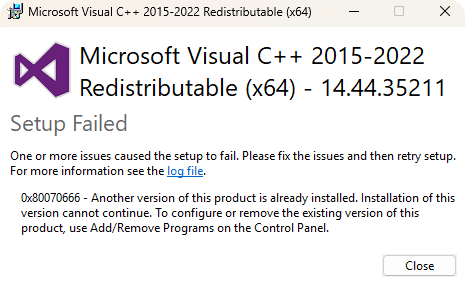
GoProceed to theuninstalluninstallationpagepage:Go touse thewindowsWindows search bar and typein"Add or Remove Programs"then click open
Search up "Visual C++ 2015-2022" in the Search Apps bar.
Clickthen click on the3three dots next to theapp.exeand then clickuninstall."Uninstall".
If backyou have encountered any problems with this guide, feel free to contact us by creating a ticket in the .exe#technical-support file and install C++ again.