
Client/Server launch options
Definition & usage
This page lists various launch options you can use when starting SCP: Secret Laboratory.
Specific arguments can help improve performance, troubleshoot issues, or customise how the game runs.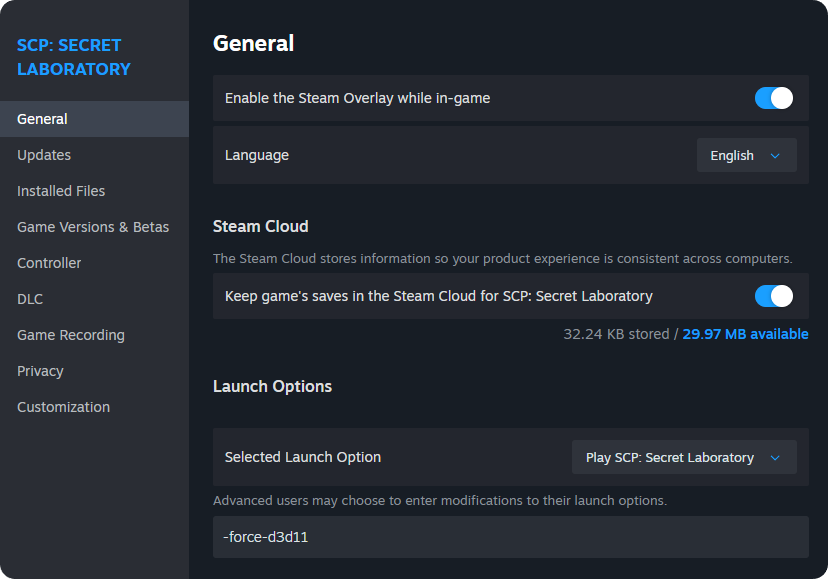
- On Steam, you can enter these arguments by Right-clicking → Properties... → Launch Options.
- Multiple options can be combined by separating them with spaces.
- Choose wisely! The tables below contain arguments that range from the technical to the less technical.
Make sure to include the - in the launch parameter, as it's required for the argument to be recognised. For example, use the following: -force-d3d11 and not: force-d3d11.
Client side│Example messages
1. The game crashes or displays a black screen...
Try running in windowed mode with full-screen mode disabled:
-screen-fullscreen 0 -popupwindow2. Steam is down or unstable; how do I launch the game using Discord?
Sometimes Steam experiences issues, or third-party Steam servers go offline. This can make it impossible to run the game, so you can force the game to use Discord authentication instead:
-fdiscord3. Running the game on a low-end system
Let's try forcing DirectX 11 and lower graphics settings:
-force-d3d11 -screen-quality FastestGame-specific arguments
| Argument | Description | Platform |
|---|---|---|
-steam |
Sets the platform to Steam. | Client only |
-discord |
Sets the platform to Discord. | Client only |
-fdiscord |
Forces Discord authentication. | Client only |
-authdebug |
It creates an EnableDebug.txt file in %appdata%. Often used for authentication debugging. |
Client only |
-noauth |
Forces the game to launch in offline mode. | Client only |
-allow-syncbind |
Security Risk: allows the server to log the keys that have been pressed (this is used in some mods or debugging contexts). | Client only |
-dnt |
Enables Do Not Track (DNT) mode. | Client only |
-nosrv |
Disables DNS SRV record resolution. | - |
-hidetag |
Hides the badge/tag above your name in-game. | Client only |
-neverhidelocaltag |
Forces the local tag to always be visible. | Client only |
-hidelocaltag |
Hides your local tag (even if shown by default). | Client only |
-nevercover |
Forces badges/tags not to be covered by the environment (debug/visual override). |
Client only |
--doh |
Enables DNS over HTTPS. | Client only |
--http11 |
Forces HTTP/1.1 to be used. This will cause slow performance. | Client only |
--http2 |
Forces HTTP/2 to be used. | Client only |
--http3 |
Forces HTTP/3 to be used. | Client only |
--tls12 |
Forces TLS 1.2 to be used. | Client & Server |
--tls13 |
Forces TLS 1.3 to be used. | Client & Server |
--ech |
Enables ECH for TLS 1.3, a security extension for TLS 1.3. | Client only |
--ipv4 |
Forces IPv4 to be used. | Client & Server |
--ipv6 |
Forces IPv6 to be used. | Client & Server |
--weak-http-security |
Forces the game to use TLS 1.2 instead of 1.3. | Client & Server |
--system-proxy |
It makes the game load using Windows proxy settings. It may not work on other operating systems. | - |
--early-data |
N/A | - |
--nagle |
Enables the Nagle algorithm. | - |
Unity engine-specific arguments
List of the most essential arguments.
See the official documentation for the full Unity list if needed.
| Argument | Description |
|---|---|
-force-d3d11 |
Forces Direct3D 11 API. |
-force-d3d12 |
Forces Direct3D 12 API. |
-force-vulkan |
Forces Vulkan API. Note: This is an experimental feature that works best on Linux/AMD systems. |
-monitor <N> |
Launch on monitor number N (1-based). |
-screen-width <px> |
Set the window width. |
-screen-height <px> |
Set the window height. |
-screen-fullscreen <0/1> |
1 = full-screen mode; 0 = windowed mode. |
-window-mode <exclusive/borderless> |
Forces the full-screen option. It's time to choose... |
-popupwindow |
Borderless (frameless) window. |
-logfile <path> |
Write the player log to a custom path. Use - for stdout. |
-nolog |
Disables player logging. |